A picture made of numbers
Hold a magnifying glass to a computer screen, or zoom into a photo until it will not go any further, and the picture falls apart into a grid of tiny squares, each one a single flat colour. Those squares are pixels, short for picture elements, and they are all there is. A digital photo of a sunset is not a sunset: it is a list of numbers that tells a screen how brightly to light each square.
Two choices decide how good that list can be. How many pixels the picture is cut into, its resolution, decides how fine the detail is. How many bits each number is given, its bit depth, decides how many shades it can tell apart. The scene lets you turn both down until the sunset breaks.
Pixels: how fine the detail is
To turn a scene into pixels, a camera or a program lays a grid over it and gives each square one colour: the average of all the light that falls inside it. Anything smaller than a square is blended away. A sharp edge, such as the side of the tree, can only follow the grid, so a slanting line becomes a staircase.
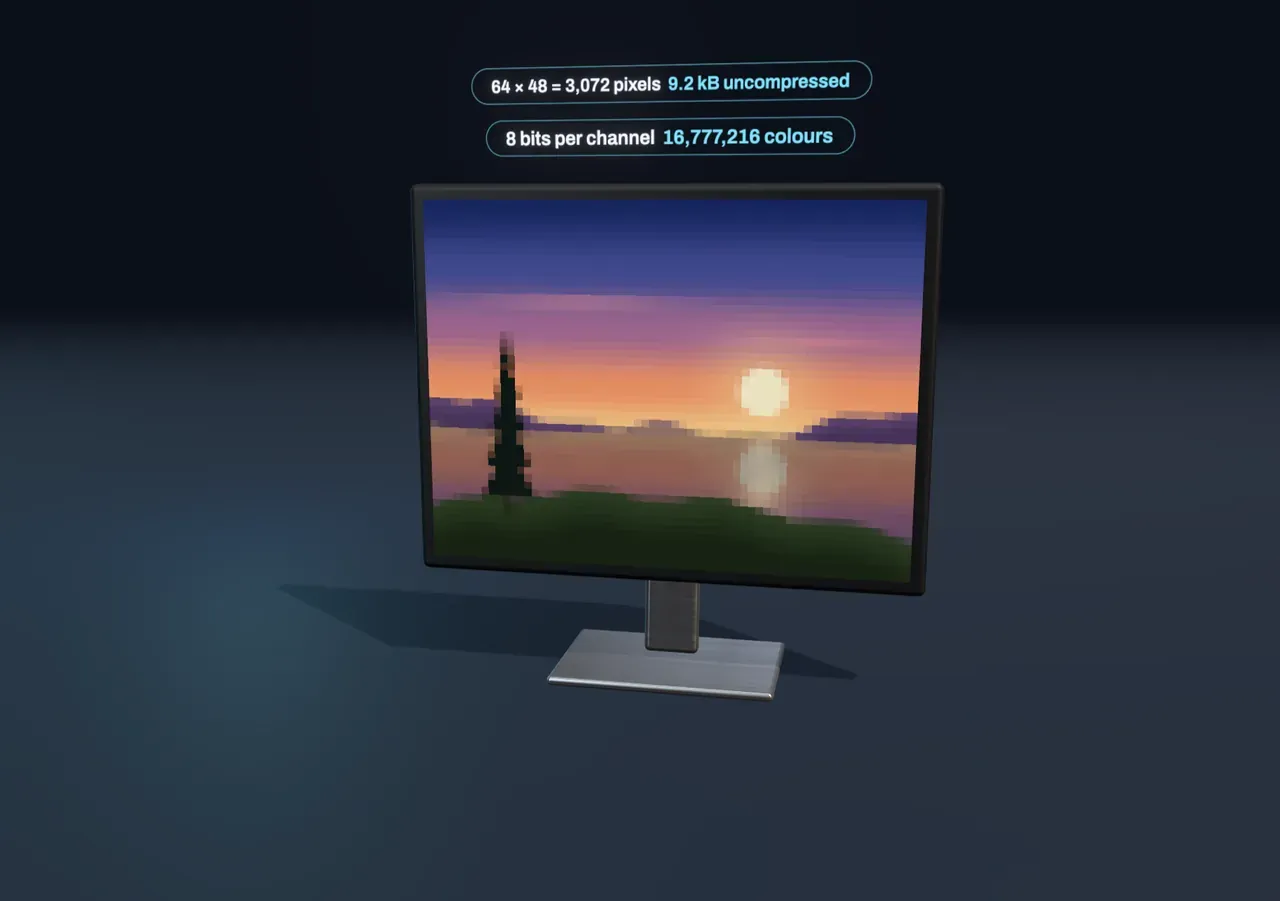
Try it: slide Pixels across down to 16 px. The whole sun now fits in a few squares, and the tree is a column of blocks. Slide up to 256 px and the staircases shrink until, from this distance, the edges look smooth.
Doubling the pixels across also doubles them down, so the picture holds four times as many. The scene’s sharpest setting has 256 × 192 = 49,152 pixels. A 12-megapixel phone camera stores about 4,000 × 3,000, which is why you can zoom into a phone photo a long way before the squares show.
Red, green and blue
Each pixel is stored as three numbers, not one, because of how our eyes see colour. The back of the eye has three kinds of colour-sensing cone cells, most sensitive to long, middle and short wavelengths of light: roughly red, green and blue. Any light we see is reduced to just three signals, how strongly it excites each kind of cone. So a screen does not need to make every wavelength of a real sunset. It only needs three lights per pixel, red, green and blue, mixed in the right amounts to excite your cones the same way.
Each of the three numbers is called a channel. Full red and full green with no blue looks yellow; all three at full looks white; all three off is black. On many screens the three lights sit side by side as thin stripes called subpixels, too small to see apart at normal distance.
Try it: drag Zoom to the pixels to the middle. A patch of the picture lifts out on a magnifier, each square one pixel. Keep going and each pixel splits into its three lights; at the end each light rises into a column as tall as the number stored for it.
Bits: how many shades
A computer stores each channel as a whole number with a fixed count of bits. One bit can only say off or on. Each extra bit doubles the choices, so a channel with bits has levels, and a pixel has possible colours. Most images use 8 bits per channel: 256 levels each, and 256 × 256 × 256 = 16,777,216 colours in all.
When a channel cannot hit the exact brightness it needs, it is rounded to the nearest level. Where the picture changes slowly, as the sky does from deep blue overhead to gold at the horizon, many neighbouring pixels round to the same level and then the next one jumps a whole step. The smooth fade breaks into flat stripes. This is called banding, or posterisation.
Try it: choose 512 colours under Bits per channel and watch the sky. Then drop to 8 colours: with only off or on for each light, the sunset is reduced to the eight mixtures of full red, green and blue. Open Zoom to the pixels at a low setting and the columns can only stand at the few heights marked on the ruler.
At 8 bits the steps are so small that neighbouring shades of a smooth sky look the same to most eyes, though banding can still creep into very dark or very gentle gradients. Screens and video made for a wide range of brightness use 10 bits or more per channel for exactly that reason.
How big is a picture?
Put the two choices together and you have the size of the picture before compression:
The readout above the screen keeps this sum. The 64 × 48 picture at 8 bits is 3,072 pixels × 3 bytes = 9,216 bytes. A 12-megapixel photo stored the same way would take about 36 million bytes, yet a phone saves it in a few million. Formats such as JPEG get there by throwing away detail the eye is least likely to miss, and formats such as PNG by finding repeated patterns they can describe more briefly. Each pixel still comes back as three numbers when the picture is shown.
What this model leaves out
The sunset is drawn by the scene from shapes and colour gradients, not taken with a camera, and its sharpest setting is 256 pixels across so that the pixels stay visible. A real camera sensor also does not measure three colours at every pixel: each of its light sensors sits under a single red, green or blue filter, and the camera estimates the other two colours from its neighbours.
The scene stores each channel as the nearest level, with nothing done to hide the steps. Real software often adds dithering, a fine scatter of slightly lighter and darker pixels that trades the bands for grain. The stored numbers are also not the amount of light: they follow a standard curve, called sRGB, that gives more levels to dark shades, where the eye is most sensitive to small steps, so a pixel stored at half its top level gives out only about a fifth of the light. The columns show the stored number. Finally, the colours you see in the scene pass through your own screen, which has its own subpixel layout and its own idea of how bright full red is.